
Update August 22nd, 2015 – Please note that this is an experiment in reading a CSV and pulling the data into Visualforce. In no way should this be part of a Production-ready solution as it DOES NOT SCALE. You will hit limits as the number of rows in the CSV increases. As a solution, this would NOT be considered a best practice.
I recently had to develop a Visualforce page that allowed a Salesforce user to upload a CSV file and then generate some records from the parsed values. Yes, I know that is what the Data Loader is for, but the intended user here was not technically adept. And I thought it was an interesting experiment.
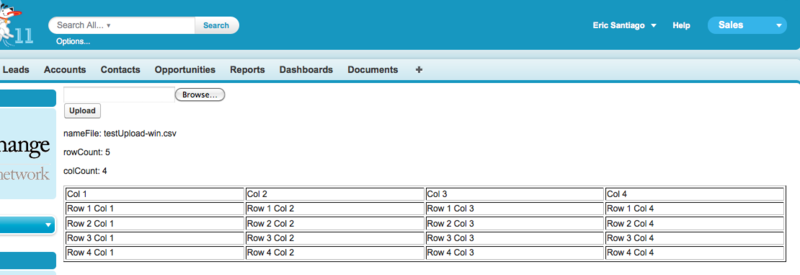
The Salesforce Developer Wiki already had a sample class for parsing the file – http://wiki.developerforce.com/index.php/Code_Samples#Parse_a_CSV_with_APEX . So, I had to just create the VF page and my controller. Though, I did modify the parsing method from the Wiki to use the carriage return in the string split. CSV’s produced on my Mac didn’t parse correctly using the newline ‘\n’. I found a good post here explaining how Windows and Mac/Unix handle carriage returns differently. Here’s the results.
Visualforce page: uploadCSV
<apex:page controller=”uploadCSVcontroller” >
<apex:form >
<apex:inputFile value=”{!contentFile}” filename=”{!nameFile}” /><br/>
<apex:commandButton value=”Upload” id=”theButton”/>
</apex:form>
<apex:outputPanel id=”results”>
<p>nameFile: {!nameFile}</p>
<p>rowCount: {!rowCount}</p>
<p>colCount: {!colCount}</p>
<table title=”CSV Output” border=”1″ width=”100%”>
<apex:repeat value=”{!results}” var=”row”>
<tr>
<apex:repeat value=”{!row}” var=”cell”>
<td> {!cell} </td>
</apex:repeat>
</tr>
</apex:repeat>
</table>
</apex:outputPanel>
</apex:page>
Apex Class:
public class uploadCSVcontroller {
public Blob contentFile { get; set; }
public String nameFile { get; set; }
public Integer rowCount { get; set; }
public Integer colCount { get; set; }public List<List<String>> getResults() {
List<List<String>> parsedCSV = new List<List<String>>();
rowCount = 0;
colCount = 0;
if (contentFile != null){
String fileString = contentFile.toString();
parsedCSV = parseCSV(fileString, false);
rowCount = parsedCSV.size();
for (List<String> row : parsedCSV){
if (row.size() > colCount){
colCount = row.size();
}
}
}
return parsedCSV;
}
/*
Credit to
http://wiki.developerforce.com/index.php/Code_Samples#Parse_a_CSV_with_APEX
*/
public static List<List<String>> parseCSV(String contents,Boolean skipHeaders) {
List<List<String>> allFields = new List<List<String>>();// replace instances where a double quote begins a field containing a comma
// in this case you get a double quote followed by a doubled double quote
// do this for beginning and end of a field
contents = contents.replaceAll(‘,”””‘,’,”DBLQT’).replaceall(‘”””,’,’DBLQT”,’);
// now replace all remaining double quotes – we do this so that we can reconstruct
// fields with commas inside assuming they begin and end with a double quote
contents = contents.replaceAll(‘””‘,’DBLQT’);
// we are not attempting to handle fields with a newline inside of them
// so, split on newline to get the spreadsheet rows
List<String> lines = new List<String>();
try {
//lines = contents.split(‘\n’); //correction: this only accomodates windows files
lines = contents.split(‘\r’); // using carriage return accomodates windows, unix, and mac files
//http://www.maxi-pedia.com/Line+termination+line+feed+versus+carriage+return+0d0a
} catch (System.ListException e) {
System.debug(‘Limits exceeded?’ + e.getMessage());
}
Integer num = 0;
for(String line: lines) {
// check for blank CSV lines (only commas)
if (line.replaceAll(‘,’,”).trim().length() == 0) break;List<String> fields = line.split(‘,’);
List<String> cleanFields = new List<String>();
String compositeField;
Boolean makeCompositeField = false;
for(String field: fields) {
if (field.startsWith(‘”‘) && field.endsWith(‘”‘)) {
cleanFields.add(field.replaceAll(‘DBLQT’,'”‘));
} else if (field.startsWith(‘”‘)) {
makeCompositeField = true;
compositeField = field;
} else if (field.endsWith(‘”‘)) {
compositeField += ‘,’ + field;
cleanFields.add(compositeField.replaceAll(‘DBLQT’,'”‘));
makeCompositeField = false;
} else if (makeCompositeField) {
compositeField += ‘,’ + field;
} else {
cleanFields.add(field.replaceAll(‘DBLQT’,'”‘));
}
}allFields.add(cleanFields);
}
if (skipHeaders) allFields.remove(0);
return allFields;
}}
 Eric Santiago